
Appearance
Sync Datapoints Between Systems
This guide explains how to synchronize datapoints (events and measurements) between external systems and YuzeData.
Overview
Datapoint synchronization involves two main operations:
| Operation | Description |
|---|---|
| Pull | Fetch events/measurements from an external system into YuzeData |
| Push | Send datapoints from YuzeData to an external system |
Each operation is implemented as a workflow step that you configure within a workflow.
When to Use This Guide
Use this guide for syncing datapoints — events and facts that are appended over time (e.g., sensor readings, transactions, logs). Datapoints are immutable and use position-based tracking.
For syncing master data — entities that can be updated (e.g., equipment, locations, suppliers) — see Sync Master Data.
Prerequisites
Before syncing datapoints, ensure you have:
- Connector instances deployed for the systems you want to pull from and push to
- A schema defined for the datapoint structure
- A bucket to store the datapoints (or use the default bucket)
Pulling Datapoints
Pull datapoints from an external system using a workflow step that consumes from a connector and produces to a datapoint feed.
How It Works
- The workflow step calls the connector to fetch data from the external system
- Data is transformed using the configured schema mapping (if provided)
- Datapoints are created and stored in the configured bucket
- Each datapoint is assigned an auto-incrementing position
Configuration
Consuming (input):
| Setting | Description |
|---|---|
| Connector | The connector instance to use for fetching data |
| Operation | The connector operation that retrieves data |
| Schema Mapping | (Optional) Transform source data to match the target schema |
Producing (output):
| Setting | Description |
|---|---|
| Schema | The schema that defines the datapoint structure |
| Bucket | Where to store the datapoints (default: default) |
Example: Pull Sensor Readings from IoT Platform
- Create a new workflow
- Add a workflow step that consumes from a connector
- Configure the consume side:
- Connector: Your IoT platform connector
- Operation: Read sensor data
- Configure the produce side:
- Schema: SensorReading
- Bucket: sensor-data
- Set a schedule (e.g., every 5 minutes)
- Activate the workflow
Each time the workflow runs, it fetches new sensor readings and stores them as datapoints.
Pushing Datapoints
Push datapoints to an external system using a workflow step that consumes from a datapoint feed and uses a connector to send the data.
How It Works
- The workflow step subscribes to datapoints from a bucket with a specific schema
- New datapoints (based on position tracking) are retrieved in batches
- Data is sent to the external system via the connector
- The checkpoint position is updated after successful processing
Position Tracking
Unlike master data (which tracks versions), datapoints use position-based tracking:
- Each datapoint has an auto-incrementing position number
- The workflow step remembers the last processed position (checkpoint)
- On each run, only datapoints after the checkpoint are processed
- This ensures exactly-once delivery to upstream systems
Run 1: Process positions 1-100 → Checkpoint: 100
Run 2: Process positions 101-250 → Checkpoint: 250
Run 3: Process positions 251-300 → Checkpoint: 300
Configuration
Consuming (input):
| Setting | Description |
|---|---|
| Schema | The schema to subscribe to |
| Bucket | The bucket to consume from |
| Batch Size | Number of datapoints to process per run |
Connector (output):
| Setting | Description |
|---|---|
| Connector | The connector instance to use for sending data |
| Operation | The connector operation that saves data |
| Schema Mapping | (Optional) Transform data before sending to the external system |
Example: Push Readings to Analytics Platform
- Create a new workflow
- Add a workflow step that consumes from a datapoint feed
- Configure the consume side:
- Schema: SensorReading
- Bucket: sensor-data
- Batch Size: 100
- Configure the connector:
- Connector: Your analytics platform connector
- Operation: Send measurements
- Set a trigger (schedule or continuous)
- Activate the workflow
Complete Datapoint Flow
A typical datapoint pipeline includes:
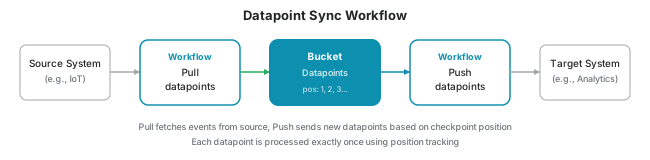
- Pull workflow: Fetches data from source system periodically
- Datapoints: Stored in a bucket with position tracking
- Push workflow: Sends new datapoints to target system based on checkpoint
Monitoring Position
View the current checkpoint position:
- Navigate to Data → Datapoints
- Find the datapoint checkpoint for your workflow
- Check the current position
The checkpoint shows:
- Last processed position
- Number of pending datapoints (if any)