
Appearance
Workflows
What is a Workflow?
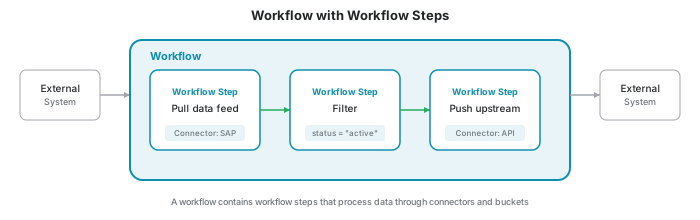
A Workflow in YuzeData is a data integration process that orchestrates the flow of data between systems. Workflows connect datapoints, connectors, and master data to automate your data operations.
Each workflow is built from workflow steps - reusable steps that perform specific operations like fetching data from an API, transforming values, or producing datapoints.
Workflows and Workflow Steps
Workflows and workflow steps work together:
| Concept | Description |
|---|---|
| Workflow | The container that defines the overall data integration process. Created from scratch for your specific needs. |
| workflow step | A step within a workflow. Built from templates that define what the step can do. |
Workflow Step Templates and Instances
Workflow steps follow a template/instance pattern:
- workflow step template: A blueprint defining a type of operation
- workflow step instance: A configured step in your workflow, created from a template with your specific settings
When you add a step to a workflow, you select a workflow step template and configure it to create an instance. This allows you to reuse the same template multiple times with different configurations.
TIP
A workflow step template describes a single step. A workflow template is something different: a complete workflow published for reuse. See Workflow Templates below.
Example Templates
Common workflow step templates include:
| Template | Description |
|---|---|
| Pull data feed | Pulls data via a configured connector into the platform as a feed |
| Push data feed upstream | Pushes a datafeed upstream via a configured connector |
| Pull and push data | Pulls data from a source system and immediately pushes it to a target system without storing it on the platform |
| Filter | Filters datapoints and creates a new stream from them |
| Datapoint aggregation | Consumes datapoints and aggregates them |
| Deduplication | Takes data from a source bucket and adds it to a target bucket while ensuring no duplicate records |
| Lookup | Retrieves data from an external system using a configured connector |
| YuzeScript | Executes a YuzeScript expression for custom transformations |
| Execute Connector | Executes a connector operation as fire-and-forget (useful for one-time queries or scheduled operations) |
| Import master data | Imports data from a connector and stores results as master data |
| Export master data | Exports master data to a connector |
| Map Master data items | Maps master data items between different systems by adding mapping identifiers from external systems |
Triggers
Workflow steps can be triggered in two ways:
| Trigger | Description |
|---|---|
| Data Feed | Triggered when new datapoints arrive in a consumed feed |
| Parent workflow step | Triggered by another workflow step, enabling workflow chaining |
A whole workflow can also run on a schedule or be started manually — see Running a workflow on a schedule.
Data Feed Trigger
When a workflow step is configured to consume a datapoint feed, it can be set to trigger automatically when new datapoints arrive. This creates a reactive pipeline where data flows through workflow steps as it becomes available.
Parent Workflow Step Trigger
A workflow step can be configured to run after another workflow step completes. This enables chaining multiple steps together, where the output of one step feeds into the next.
Running a workflow on a schedule
A workflow can run automatically on a schedule — for example, every hour or daily at a specific time — or you can start it manually at any time. The schedule applies to the workflow as a whole: each time it fires, the workflow runs. When a schedule is configured, it is shown on the workflows overview.
Consuming and Producing Data
Workflow steps process data by consuming input and producing output. This is how data flows through your workflows.
Consuming Data
A workflow step can consume data from several sources:
| Source | Description |
|---|---|
| Datapoint Feed | Reads datapoints from a bucket with a specific schema |
| Connector | Fetches data directly from an external system via a connector operation |
| Master Data | Reads reference data items for enrichment or processing |
| Nothing | The workflow step does not consume any data |
When consuming from a datapoint feed, you configure:
- Schema: Which schema's datapoints to subscribe to
- Bucket: Which datapoint bucket to read from
- Batch Size: How many datapoints to process per run
When consuming from a connector, you can apply schema mappings to transform the connector's input and output data to match your workflow's schemas.
Producing Data
A workflow step can produce its output as datapoints, as master data, or produce nothing:
| Strategy | Description |
|---|---|
| Datapoint Feed | Writes datapoints to a bucket with a specific schema |
| Master Data | Writes the produced items as master data; each item names its type in its Identifier |
| Nothing | The workflow step does not produce output (e.g., when writing directly to an external system) |
When producing to a datapoint feed, you configure:
- Schema: The structure of the output data
- Bucket: Which datapoint bucket to write to
Producing master data needs no further configuration. Each produced item must include a DisplayName and an Identifier such as master-data:Equipment:PUMP-001. The identifier names the master data type, so one step can write items of several types. Items are matched on their identifier, so running the step again updates them instead of creating duplicates. To link an item to its identifiers in other systems, include a MappingIdentifiers field listing the values per source system. They are added to the item's existing mapping identifiers; none are removed. Any other fields on the item are stored as its master data. This lets any step — not just the dedicated Import master data step — write master data as its output. See YuzeScript for an example.
Chaining Workflow Steps
Consuming and producing enables chaining - connecting workflow steps together so data flows through multiple processing steps.
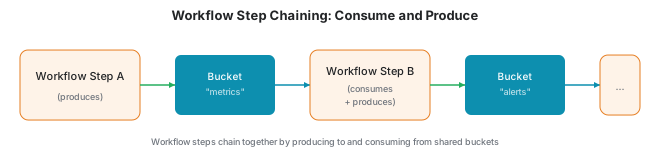
- Workflow step A produces datapoints to bucket "metrics"
- Workflow step B consumes from bucket "metrics"
- Workflow step B processes the data and produces to bucket "alerts"
- Workflow step C consumes from bucket "alerts" and sends notifications
This pattern allows you to build complex data pipelines from simple, focused steps.
Settings
Each workflow step instance has settings that control its behavior. Settings are defined by the template and configured when you create an instance.
Template-Defined Settings
The workflow step template defines which settings are available. Common settings include:
| Setting Type | Examples |
|---|---|
| Filter conditions | Field comparisons, AND/OR logic |
| Aggregation rules | Group by fields, aggregation operations |
| Deduplication fields | Which fields to use for duplicate detection |
| Script expressions | YuzeScript code for custom transformations |
Connector Settings
When a workflow step uses a connector, you configure which connector instance and operation to use. This links the workflow step to your deployed connectors.
Capacity Settings
For workflow steps that process large amounts of data or require more resources, you can configure capacity settings to control how the workflow step executes.
Execution Preference
| Mode | Description |
|---|---|
| In-Process | Runs within the standard processing infrastructure (default) |
| Out-of-Process | Runs in a dedicated container with configurable resources |
Compute Specifications
When using out-of-process execution, you can select a compute specification:
| Specification | CPU | Memory |
|---|---|---|
| Small | 0.25 cores | 0.5 GB |
| Medium | 1 core | 2 GB |
| Large | 2 cores | 4 GB |
| Extra Large | 4 cores | 8 GB |
Use higher capacity settings for workflow steps that:
- Process large batches of datapoints
- Perform complex transformations
- Call external systems with slow response times
Workflow Templates
A workflow template is a published snapshot of an entire workflow — its steps, schemas, schema mappings, and connector references — packaged so it can be reused. Publishing a workflow as a template makes it available to everyone in your organization.
Workflow templates and workflow step templates are different things:
| Concept | What it describes |
|---|---|
| workflow step template | A blueprint for a single step within a workflow |
| workflow template | A complete workflow, published as a reusable package |
Key characteristics:
- Published to the library: Templates appear in Library → Workflow Templates, where they can be deployed as new workflows.
- Versioned: Every publish creates a new version that never changes afterwards. You can keep improving the source workflow and publish updates without affecting workflows that were already deployed from an earlier version.
- Shared with child customers: Child customers see the templates published by their parent organization in their own library. They can deploy them, but cannot change or delete them.
- Independent of the source workflow: A template can outlive the workflow it was published from. Deleting the source workflow lets you choose whether to keep or remove the template.
See the Workflow templates guide for step-by-step instructions on publishing, deploying, and managing templates.
Audit
The Audit tab on a workflow's details page shows who changed the workflow and its steps, what they changed, and when. Changes are grouped by day, with the newest first. Each entry says who made the change and where it came from: the web app, the MCP server, the assistant, the Partner API, or a migration. Expand an entry to see each changed field with its value before and after. Changes to code and configuration fields, such as SQL or JavaScript, are shown as a diff. When a step is moved to or from another workflow, the entry on both workflows says so and shows the old and the new workflow in its details.
Some values are never shown:
- Secret settings, and settings whose definition can no longer be found, show as Hidden.
- Workflow variables show their name only, because they can hold credentials.
Workflows that existed before change tracking was switched on start with a Change tracking started entry. It records the workflow and its steps as they were at that moment. Earlier edits, and who made them, are not known.