
Appearance
Schemas
What is a Schema?
A Schema in YuzeData defines the structure of data flowing through your integrations. It acts as a contract that specifies what fields exist, their data types, and validation rules.
Schemas ensure data consistency across your workflows by defining exactly what data looks like when it moves between systems.
Schema Sources
YuzeData provides two types of schemas:
| Source | Description |
|---|---|
| Built-in Schemas | Pre-defined by the platform for common use cases. Cannot be modified. |
| Custom Schemas | Created for your specific integration needs. Fully editable. |
Fields and Data Types
Each schema consists of fields that define individual pieces of data.
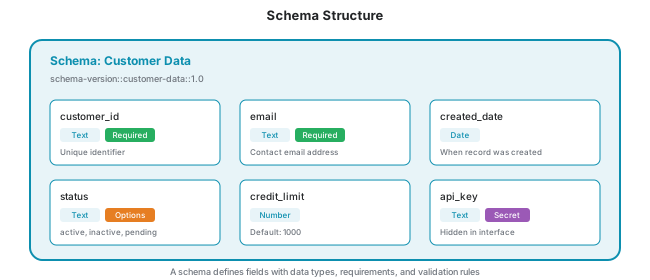
Field Properties
| Property | Description |
|---|---|
| Code | Unique identifier for the field within the schema |
| Display Name | Human-readable name shown in the interface |
| Data Type | The kind of data the field holds (see Available Data Types below) |
| Required | Whether the field must contain a value |
| Options | Pre-defined list of allowed values (creates a dropdown) |
Available Data Types
| Data Type | Description | Example |
|---|---|---|
| Text | Free-form text strings | "Hello World" |
| Number | Numeric values (integers and decimals) | 42, 3.14 |
| Boolean | True or false values | true, false |
| DateTime | Date and time combined | 2026-01-15T14:30:00 |
| DateOnly | Date without time | 2026-01-15 |
| TimeOnly | Time without date | 14:30:00 |
| TimeSpan | Duration or time interval | 02:30:00 (2 hours 30 minutes) |
| DateTimeOffset | Date and time with timezone offset | 2026-01-15T14:30:00+02:00 |
| Guid | Globally unique identifier | 550e8400-e29b-41d4-a716-446655440000 |
| Binary | Binary data stored as base64 | File contents, images |
| File | A reference to a file (PDF, image, or document) held in the platform; shown as the file name with a download link | report.pdf |
| ReferenceData | Reference to a master data item | master-data:Equipment:PUMP-001 |
| Options | One value from a pre-defined list | Dropdown selection |
| ArrayOfText | List of text values | ["tag1", "tag2", "tag3"] |
| DictionaryOfText | Key-value pairs of text | {"key": "value"} |
Complex Fields
Fields can contain nested structures for more sophisticated data:
| Structure | Description |
|---|---|
| Sub-fields | Fields containing nested object structures |
| Arrays | Fields containing lists of items |
Schema Fields vs Connector Settings
YuzeData distinguishes between two types of field definitions:
| Type | Used For | Example |
|---|---|---|
| Schema Fields | Defining the structure of data (datapoints, master data) | A "Temperature" field of type Number in a sensor readings schema |
| Connector Settings | Configuring connector and operation behavior | An "API Key" setting marked as secret, or a "Polling Interval" with a default value |
Schema fields define what data looks like — they appear in schema editors, datapoint explorers, and data feeds. Connector settings define how connectors behave — they appear in connector and workflow step configuration, and support additional properties like secret values, default values, and UI grouping.
TIP
When creating schemas for your data, you work with schema fields. You only encounter connector settings when configuring connectors or workflow steps.
Versioning
Schemas use versioning to manage changes safely without breaking existing integrations.
Version Format
Schemas use Major.Minor versioning (e.g., 1.0, 1.1, 2.0). Each version is uniquely identified by a Schema Version ID that combines the schema code and version number:
schema-version::{schema-code}::{major}.{minor}For example: schema-version::customer-data::1.0
Schema Usage
Schemas connect to multiple parts of the platform:
Datapoints
Datapoints can be associated with a schema that defines their structure, fields, and data types.
Workflow Steps
Workflow steps use schemas to define their data inputs and outputs:
- Consumes: The schema defining input data the workflow step processes
- Produces: The schema defining output data the workflow step creates
Connector Operations
Each connector operation has schemas for its data:
- Input Schema: Data structure the connector expects to receive
- Output Schema: Data structure the connector returns
Master Data
Master data types can optionally use schemas to define the structure of their items.
Schema Mappings
Schema mappings transform data between different schemas:
| Mapping Type | Description |
|---|---|
| Field-to-field | Direct mapping from source field to target field |
| Fixed value | Provide a constant value for a target field |
| Expression | Transform data using expressions |