
Appearance
Connectors
What are Connectors?
Connectors are reusable integration components that bridge external systems with the YuzeData platform. They provide a standardized way to connect to databases, REST APIs, cloud services, IoT platforms, and other data sources.
Templates and Instances
Connectors have two forms:
| Concept | Description |
|---|---|
| Connector Template | The blueprint - defines what settings are needed and what operations are available |
| Connector Instance | A configured deployment with actual credentials for your organization |
Connector templates available to your organization are configured based on your domain and use cases. When you deploy a connector, you're creating an instance from a template. Multiple instances can be created from the same template (e.g., connecting to different Salesforce orgs).
See HTTP API Connector for step-by-step instructions on setting up an HTTP API connector.
Operations
Each connector provides one or more operations - discrete actions it can perform against the external system.
What is an Operation?
An operation represents a specific capability of a connector, such as:
- Fetching records from an API
- Creating or updating data in an external system
- Triggering an action in a third-party service
- Synchronizing data between systems
Input and Output Schemas
Operations define schemas for their inputs and outputs:
- Input Schema: Specifies what data the operation needs to run (e.g., a date range, filter criteria, or record ID)
- Output Schema: Describes the structure of data returned by the operation
These schemas enable:
- Validation of data before execution
- Mapping between workflow data and connector data
- Clear contracts between connectors and workflows
Operation Capabilities
Each operation displays capability badges that tell you what advanced features it supports. These are detected automatically — you don't need to configure them.
| Capability | What it means |
|---|---|
| Paging | Handles large datasets automatically by retrieving data in batches instead of all at once |
| Checkpoint resume | Remembers where it left off between runs, so subsequent executions only fetch new or changed data |
| Master data sync | Designed to synchronize master data with the platform |
| Dynamic output | Works with any data structure, not just a fixed format. Typically requires a schema mapping to transform the output into a known schema |
| Configurable | Has additional settings you can customize when deploying the operation |
TIP
Capabilities help you pick the right operation for your use case. For example, if you need to sync large datasets incrementally, look for operations with both Paging and Checkpoint resume badges.
Operation Dependencies
Some operations depend on other operations to function. For example, an operation that processes orders might first need to fetch customer data.
Dependencies can be:
- Within the same connector: One operation calls another
- Cross-connector: An operation requires data from a different connector
Settings
Connectors are configured through settings - fields that define how to connect to the external system.
Setting Types
| Type | Description | Example |
|---|---|---|
| Connection | URLs, endpoints, environment selection | API base URL |
| Authentication | Credentials for accessing the system | API key, username/password, OAuth tokens |
| Configuration | Behavioral options | Polling interval, batch size |
Secret Settings
Sensitive settings (API keys, passwords, tokens) are marked as secrets:
- Encrypted at rest using customer-specific encryption keys
- Never displayed in plain text in the UI
- Securely passed to operations during execution
Invocation Modes
Connectors can execute in different ways depending on your needs:
| Mode | Description | Use Case |
|---|---|---|
| Direct | Can be used directly in workflow steps | Workflow-driven data fetching |
| HTTP API | Exposed as an HTTP endpoint | Webhooks and external system callbacks |
| Batched | Collects requests and processes them together | High-volume operations |
| Scheduled | Runs automatically on a cron schedule | Periodic data synchronization |
Direct Mode
In direct mode, workflows invoke connector operations to fetch or send data to external systems.
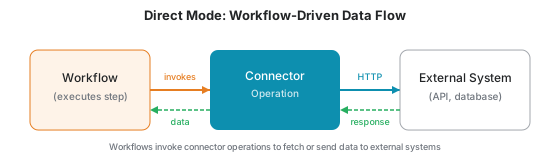
How it works:
- A workflow step invokes a connector operation
- The connector calls the external system (API, database, etc.)
- The external system returns a response
- The connector passes the data back to the workflow
- The workflow can then produce datapoints, update master data, or continue processing
This is the most common pattern for integrations where YuzeData needs to pull data from external systems on demand.
HTTP API Mode
HTTP API mode exposes a connector as an inbound HTTP endpoint that external systems can call directly. Instead of YuzeData pulling data from an external system, the external system pushes data to YuzeData.
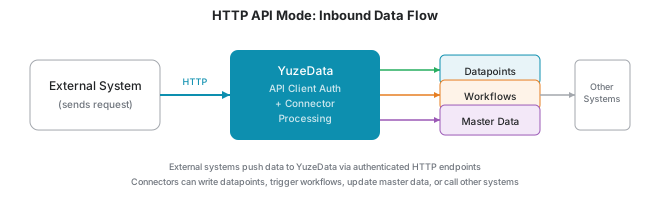
How it works:
- External system sends an HTTP request to the connector's endpoint
- YuzeData validates authentication (OAuth token or webhook signature)
- The connector processes the request
- Data can be written to datapoints, trigger workflows, or return a response
Authentication:
You can create API clients for fine-grained authorization control. Each API client can be granted access to specific connectors, allowing you to:
- Give different external systems their own credentials
- Control which connectors each system can access
- Revoke access independently per client
API clients are managed in Manage → API Clients.
Use cases:
- Receiving webhook events from external systems
- Accepting callbacks when external processes complete
- Allowing third-party systems to push data into YuzeData