
Appearance
Schema Mappings
What is a Schema Mapping?
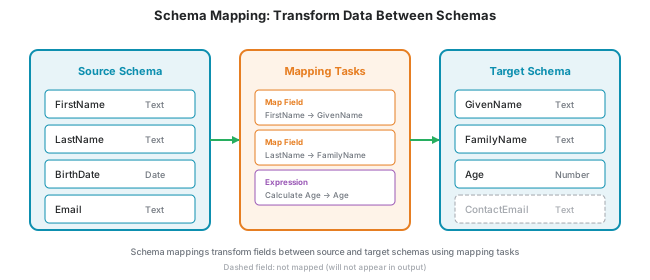
A Schema Mapping transforms data from one schema (source) to another schema (target). Schema mappings are essential when integrating systems that represent the same information differently—with different field names, data types, or structures.
Without mappings, you would need to manually transform data or write custom code for every integration. Schema mappings provide a reusable, visual way to handle these transformations.
Example
When a connector returns customer data with fields like FirstName and LastName, but your target system expects GivenName and FamilyName, a schema mapping automatically handles this conversion.
Mapping Tasks
Schema mappings consist of tasks that define how each field is transformed. Tasks execute sequentially in order, and later tasks can use outputs from earlier tasks.
Map Field
Copies data from a source field to a target field with automatic type conversion.
| Setting | Description |
|---|---|
| Source Field | The field to read from the input data |
| Target Field | The field to write to in the output data |
Use this for renaming fields or repositioning data between schemas.
Provide Value
Injects a constant value into a target field that doesn't exist in the source data.
| Setting | Description |
|---|---|
| Target Field | The field to write to in the output data |
| Value | The constant value to use |
Use this for adding default values, metadata, or system-specific information (e.g., always setting a DataSource field to a specific value).
Expression
Executes code against input data to create calculated or transformed fields.
| Setting | Description |
|---|---|
| Target Field | The field to write to in the output data |
| Expression | The code that produces the value |
Use this for complex transformations like concatenating fields, applying business logic, or performing calculations.
Master Data Item Identifier
Builds a reference to a master data item from a value in the source data, and writes it to a target field. Use this when incoming data names a master data item by a key (for example a supplier code or country code) and you want the output to point at the matching item.
| Setting | Description |
|---|---|
| Master Data Type | The type of master data item the reference points to (e.g., Supplier, Location, Country) |
| Source Key Field | The field whose value identifies the item |
| Target Field | The field to write the reference to in the output data |
| External identifier | Turn on when the source value identifies the item in another system rather than by its YuzeData key |
| Source system | The name of that other system (shown only when External identifier is on) |
Internal vs. external
Leave External identifier off when the source value is the item's own YuzeData key. Turn it on when the source value is the item's ID in another system — for example a supplier number in SAP, a record ID in Salesforce, or an ISO country code — and enter that system's name in Source system. YuzeData then resolves it to the right item through the item's mapping identifiers, so the same item is matched no matter which system's ID arrives.
See External Identifiers for more on referencing items across systems.
Task Execution
Mapping tasks execute in the order they are defined. Each task can:
- Read from the original source data
- Read outputs from previous tasks
- Write to the target schema
Only explicitly mapped fields appear in the output—fields without mappings are not automatically copied.
Using Schema Mappings in Workflow Steps
Schema mappings integrate with workflow steps at several points in the data flow.
Consume Feed
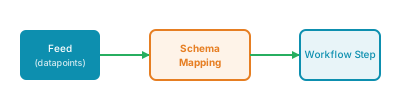
When a workflow step consumes datapoints from a feed, you can apply a schema mapping to transform the incoming data before processing.
Connector Transformation
When using connectors in a workflow step, you can apply schema mappings to transform data:
- Input: Transform data before sending it to the connector to match the schema it expects
- Output: Transform the connector's response before it's used by the workflow step

Produce Feed
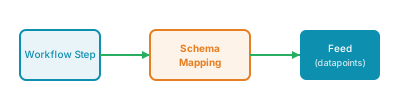
When a workflow step produces datapoints to a feed, you can apply a schema mapping to transform the output data before it's written to the feed.
Reusability
A single schema mapping can be used across multiple workflow steps and connectors. This allows you to:
- Define transformations once and reuse them
- Normalize data from multiple sources into a unified schema
- Update mappings in one place to affect all workflows using them